How to Boost WiFi Signal at Home: Philippines & Bangladesh Complete Guide 2025
📋 Quick Navigation
Why is my WiFi slow in the Philippines? How to improve WiFi speed in Bangladesh? These are common questions in our region. Whether you're dealing with PLDT home WiFi slow issues, Globe at home signal problems, or GP broadband speed drops, this guide provides practical, affordable solutions tailored for Southeast Asian homes.
⚡ Quick Fixes for Filipino & Bangladeshi Homes
1. Universal Restart Method (Works for All ISPs)
Before anything else, try this simple fix for PLDT WiFi slow solution, Globe at home signal issues, or Converge fiber WiFi problems:
- Unplug your modem/router for 60 seconds
- Wait for all lights to go off completely
- Plug back in and wait 5 minutes
- This clears cache and resets connection to your ISP
2. Optimize for Concrete Walls (Common in PH/BD Homes)
Concrete walls in Filipino and Bangladeshi homes significantly reduce WiFi signal. Solutions:
- Place router in central location, not in corner rooms
- Avoid placing near reinforced concrete columns
- Use WiFi extenders for multi-story homes (common in BD)
- Consider mesh systems for large Philippine homes
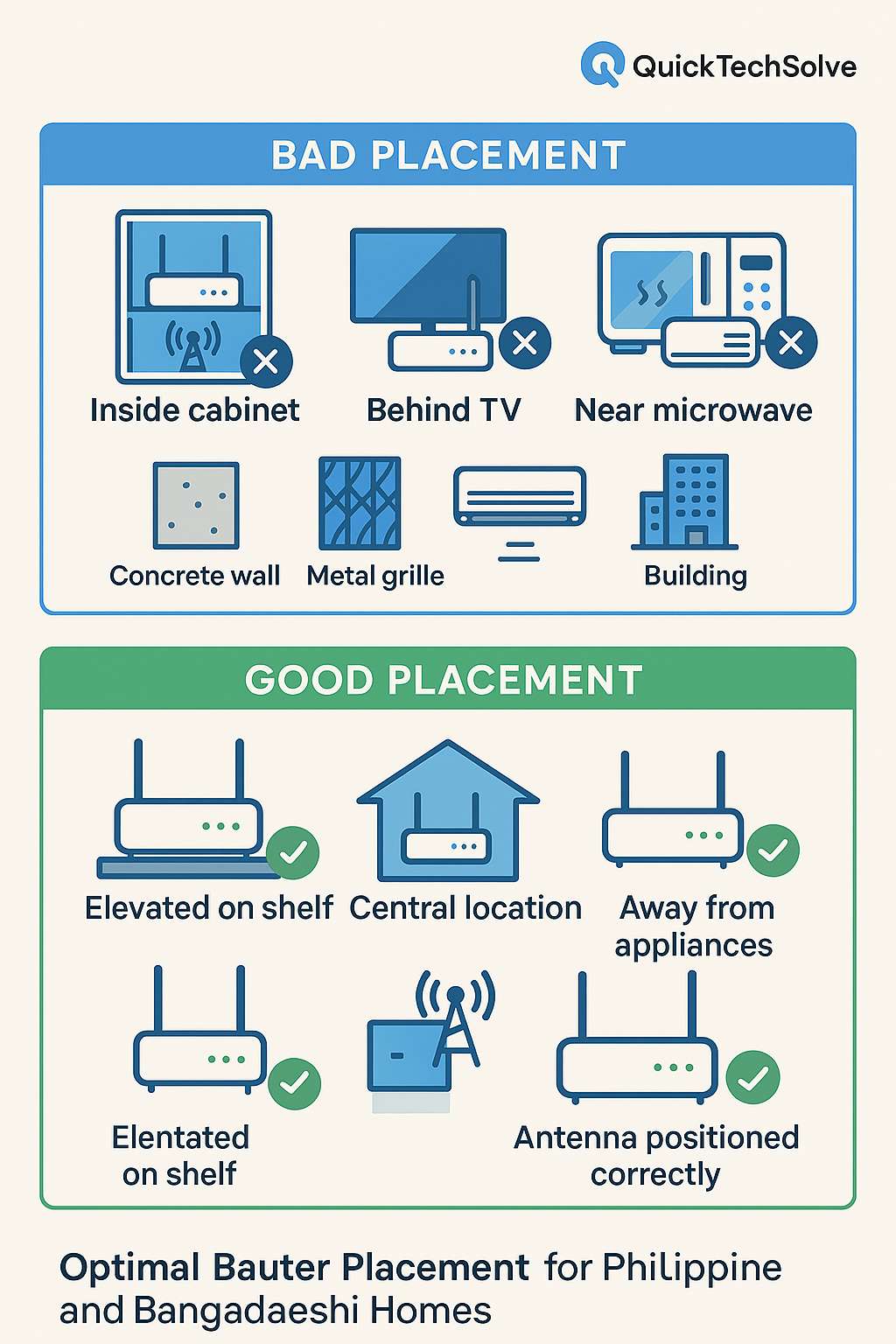
🏠 Best Router Placement for Philippines Homes
Optimizing PLDT, Globe, Converge Router Position
How to increase WiFi coverage Philippines with proper placement:
1. Elevated position - On shelf 1.5m high
2. Central location - Middle of house, not in sala only
3. Away from appliances - Separate from TV, microwave, aircon
4. Open space - Not inside wooden/glass cabinets
5. Avoid corners - Corners kill signal in condos/apartments
Change Your WiFi Channel for Better Speed
To improve WiFi speed Philippines, choose the right frequency:
- Use 2.4GHz for: Larger homes, through walls, older devices
- Use 5GHz for: Gaming, streaming, devices near router
- Pro Tip: Most PLDT and Globe routers support both - connect phones/laptops to 5GHz
🏠 Router Placement Tips for Bangladesh Homes
Optimizing GP Broadband & Other BD ISPs
How to make WiFi faster in Bangladesh with smart placement:
- Apartment buildings: Place router away from neighbors' routers to avoid interference
- Multi-family homes: Central position on middle floor if possible
- Avoid metal grilles: Common in BD windows - they block signal
- WiFi booster price in Bangladesh: Consider extenders if router can't be moved
📡 PLDT & Globe WiFi Specific Fixes 2025
PLDT Home WiFi Slow Solution
How to fix slow internet Philippines specifically for PLDT:
- Access PLDT router: 192.168.1.1 (admin/password)
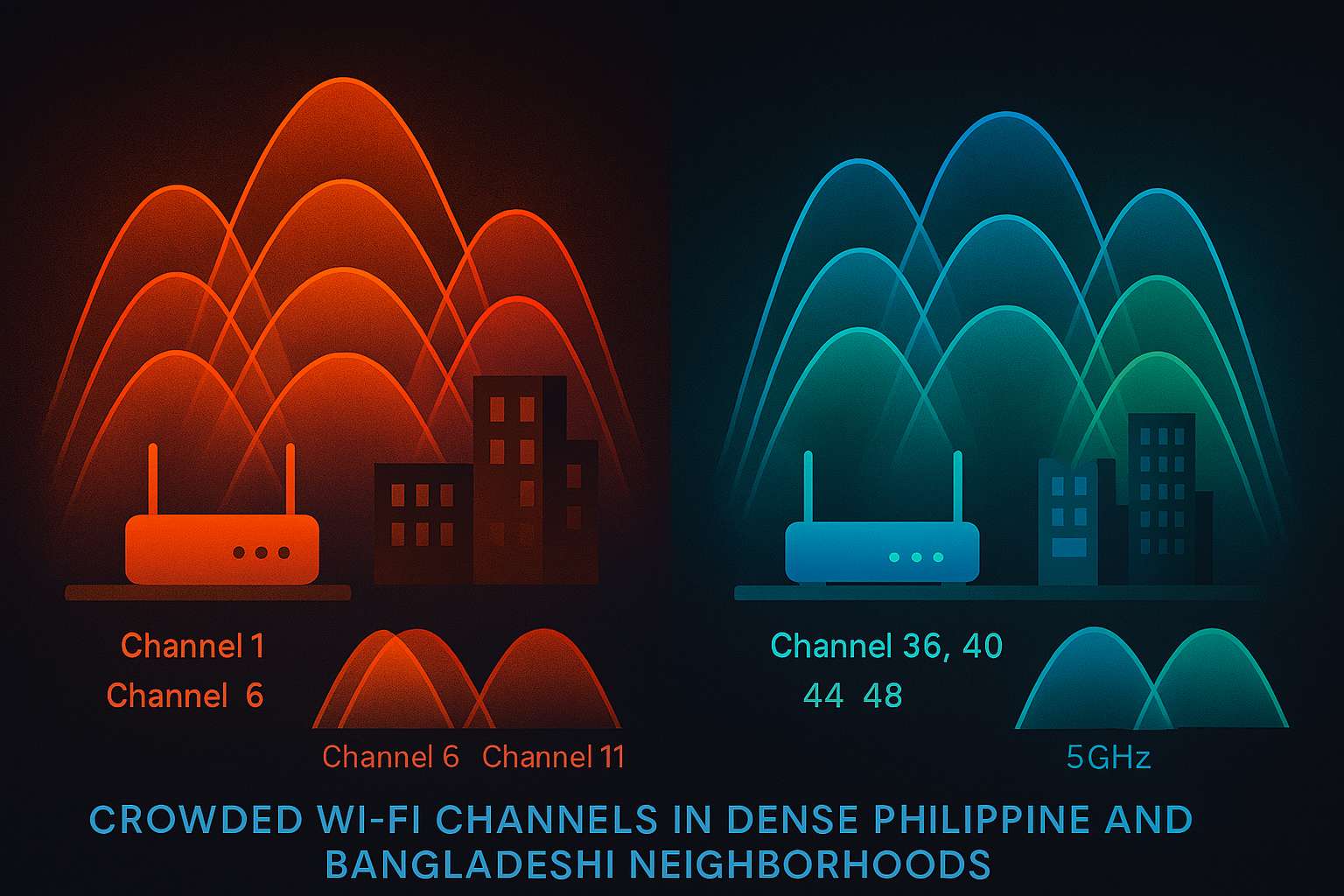
- Change WiFi channel to 1, 6, or 11 (less congested)
- Enable QoS (Quality of Service) in settings
- Update firmware through PLDT admin panel
- Consider PLDT WiFi mesh for large homes
Globe at Home Signal Booster Tips
Increase Globe WiFi speed 2025 with these methods:
- Login: 192.168.254.254 (user/user)
- Change from 20MHz to 40MHz bandwidth
- Separate 2.4GHz and 5GHz networks with different names
- Check for firmware updates monthly
- Request Globe technician visit if signal remains weak
📡 GP Broadband & Bangladesh ISP Solutions
How to Improve GP Broadband WiFi
Real-time WiFi speed fix Bangladesh for GP users:
- Contact GP support for router optimization
- Request newer router if using old model
- Use Ethernet cable for desktop computers
- Check for local network congestion during peak hours
- Consider GP Fiber upgrade if available
BD Internet Slow Solution: General Tips
Improve WiFi speed Bangladesh across all ISPs:
- Use WiFi analyzer app to find best channel
- Avoid peak hours (8-11 PM) for heavy downloads
- Connect important devices via 5GHz band
- Regularly restart router (weekly)
- Check for unauthorized users on network
💰 Affordable Ways to Boost WiFi Signal
Philippines: Budget-Friendly Solutions
Affordable ways to boost WiFi signal Philippines under ₱1,000:
- ₱500: WiFi repeater from Lazada/Shopee
- ₱300: Long Ethernet cable to reposition router
- ₱200: DIY reflector using aluminum foil
- Free: Channel optimization via router settings
Bangladesh: Cheap WiFi Improvement
Cheap ways to improve WiFi signal Bangladesh under ৳1,000:
- ৳800: TP-Link repeater from local markets
- ৳500: Quality Ethernet cable (10 meters)
- ৳300: USB WiFi adapter with better antenna
- Free: Router firmware update
🎮 How to Reduce Lag Philippines/Bangladesh
Gaming & Streaming Optimization
Reduce lag Philippines and reduce lag BD internet for better gaming:
1. Connect gaming PC/console via Ethernet cable
2. Enable QoS (Quality of Service) in router
3. Prioritize gaming device in QoS settings
4. Use 5GHz band for gaming
5. Close background downloads during gaming
6. Choose servers closest to PH/BD (Singapore/Japan)
🛠️ Best WiFi Router Philippines & Bangladesh 2025
Recommended Routers for Filipino Homes
Best WiFi router Philippines options available in malls:
- Budget: TP-Link Archer C6 (₱1,500-2,000)
- Mid-range: ASUS RT-AX55 (₱3,000-4,000)
- Mesh System: TP-Link Deco M4 (₱5,000/set of 2)
- Pro Tip: Replace ISP-provided router for better performance
Recommended Routers for Bangladesh
Best router for home Bangladesh available in local markets:
- Budget: Tenda AC10 (৳2,000-2,500)
- Mid-range: TP-Link Archer C80 (৳3,500-4,000)
- For gaming: ASUS RT-AC68U (৳6,000-7,000)
- Note: Check compatibility with your ISP first
❓ Philippines & Bangladesh Specific FAQ
This is network congestion during peak hours. Most Filipinos use internet after work/school. Solution: Schedule downloads for late night, use 5GHz band, or contact PLDT about upgrading your plan. Also check our slow internet fixes guide for more tips.
Bangladeshi apartments often have signal-blocking materials. Solutions: 1) Place router centrally, 2) Use WiFi repeater, 3) Consider powerline adapters, 4) Upgrade to router with better antennas. WiFi booster price in Bangladesh starts from ৳800.
Mesh system is better for large Filipino homes (100+ sqm) with multiple floors. Extender works for small to medium homes. For condos under 50sqm, a good router placement often suffices.
Converge fiber issues often relate to router placement or device limits. 1) Ensure router is in open area, 2) Limit connected devices to 15-20, 3) Use 5GHz for compatible devices, 4) Contact Converge for router upgrade if using old model.
In crowded Bangladeshi neighborhoods, use channels 1, 6, or 11 on 2.4GHz. For 5GHz, use channels 36, 40, 44, or 48. Use a free WiFi analyzer app to see which channels your neighbors use and pick the least crowded.
🇵🇭🇧🇩 Need More Tech Help?
Check out our Android Help Section for solutions to common smartphone problems!
Contact Us for Help